Most productivity advice on the internet about “building a second brain” is tailored for content creators or aesthetic planners. You see intricate colour-coded dashboards, daily gratitude journals, and elaborate tag systems that require thirty minutes of daily administrative upkeep.
For engineers, systems administrators, and anyone managing real-world complexity, that approach collapses within forty-eight hours.
When you are tracking infrastructure deployments, managing business decisions, planning household projects, cataloguing long-term wealth strategies, or preserving personal memories, you don’t need high-maintenance fluff. You need speed, deterministic search, robust automation, and absolute data sovereignty.
Like many people, I spent years cycling through fragmented note-taking solutions:
- Fleeting snippets trapped in Google Keep.
- Architecture notes and meeting minutes locked inside OneNote’s proprietary database.
- Dozens of
random.txtandrandom1.txtfiles scattered across local desktop folders and remote server home directories.
That fragmentation ended when I consolidated my working knowledge into Obsidian.
Today, my Obsidian setup serves as a unified second brain covering every facet of my life: business ventures, family administration, homelab infrastructure, server configurations, wealth management, house planning, personal memories, draft articles, and permanent technical knowledge.
Here is a practical look inside my production Obsidian setup: how I balance multi-vault isolation, automate multi-channel web ingress, leverage an autonomous AI agent to organize my inbox, and combine end-to-end encrypted mobile sync with perpetual Git backups.
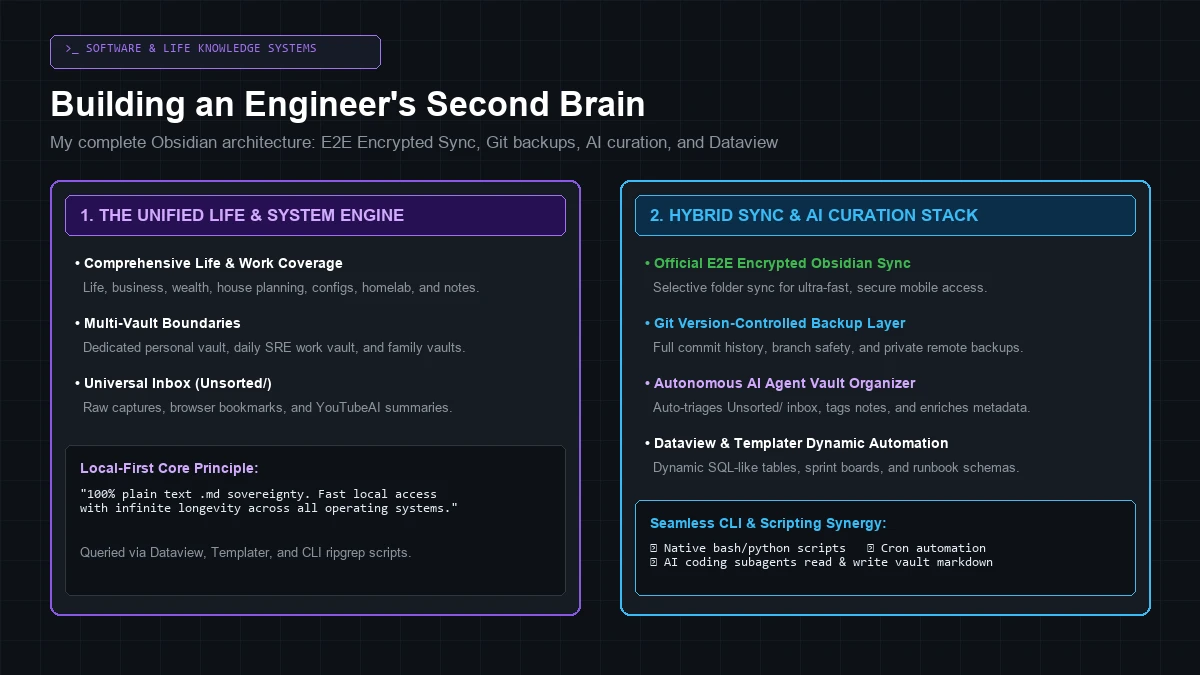 Production Obsidian architecture: combining local-first Markdown vaults with official E2E encrypted sync, Git backups, autonomous AI organization, and Dataview queries.
1. The Multi-Vault Strategy: Hard Domain Isolation
The first architectural decision in building a reliable knowledge system is vault boundary separation.
Rather than dumping everything into a single monolithic folder, I maintain distinct, physically isolated vaults:
┌─────────────────────────────────────────────────────────────────────────────────────────────┐
│                             Multi-Vault Boundary Separation                                 │
├───────────────────────────────┬───────────────────────────────┬─────────────────────────────┤
│ 1. Personal Vault (dObsidian) │ 2. Dedicated Work Vault (SRE) │ 3. Partner / Family Vaults  │
│ • Life, business & wealth     │ • Production incident logs    │ • Household administration  │
│ • House planning & homelab    │ • Internal runbooks & tickets │ • Shared travel & documents │
│ • Blog drafts & memories      │ • On-call postmortems         │ • Independent sync profiles │
└───────────────────────────────┴───────────────────────────────┴─────────────────────────────┘
Why Separation Matters:
- Security & Data Compliance: Work-related documentation, internal ticket references, and operational postmortems remain strictly isolated on corporate-compliant storage.
- Context Clarity: When I am working during the day, my search space is 100% focused on active systems engineering without personal distractions.
- Independent Sync Lifecycles: Each vault has its own dedicated sync profile, backup schedule, and access permissions.
2. Vault Taxonomy: A Complete Life & Systems Hierarchy
Inside my primary personal vault, I use a structured numeric hierarchy that organizes everything from active development sprints to personal life milestones:
dObsidian/
├── 0 - 🏠 Index/ # Master dashboards, pinned launchpads, and quick links
├── 00 Monthly Tasks/ # Active monthly sprints, milestones, and task boards
├── 1 - 🔨 Projects/ # Active development projects, microservices, and deployments
├── 2 - 💓 Life/ # Health, fitness, travel, and personal administration
├── 3 - ㊙ Interests/ # Deep-dive research, hobbies, and reading notes
├── 4 - 🧑🤝🧑 People & Places/ # Contact logs, vendor contacts, and meeting notes
├── 5 - 🧠 Knowledge/ # Permanent technical docs, Linux guides, language cheat sheets
├── 6 - 🔒 Private/ # Encrypted personal files, wealth planning, and sensitive archives
├── Clippings/ # Browser extension web clippings and raw articles
├── WebIngress/ # Automated article and bookmark ingestion
├── YouTubeAI/ # AI-generated video transcripts and technical summaries
├── Unsorted/ # The Universal Inbox for fleeting captures
├── zTemplates/ # Templater boilerplate schemas and runbook templates
└── zz_Archive/ # Deprecated projects and retired documentation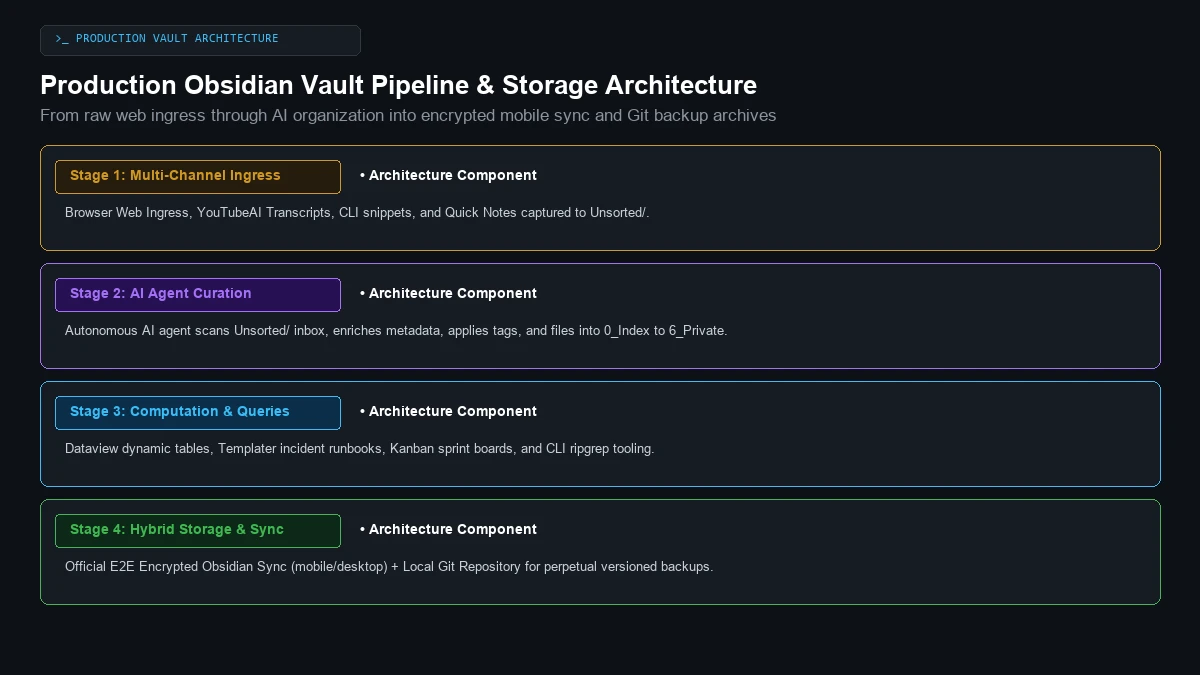 The complete lifecycle of a note: from multi-channel capture into Unsorted/, through AI curation, into Dataview dashboards, encrypted mobile sync, and Git backups.
3. The Ingress Pipeline & Autonomous AI Organization
A common point of failure in second-brain systems is capture latency and organization friction. If filing a note requires making five manual decisions, notes pile up into unmanageable clutter.
To eliminate this friction, my vault uses a two-phase capture-and-organize pipeline:
Phase 1: Zero-Friction Capture into Unsorted/
Every raw input lands in the Unsorted/ inbox folder first:
- Web Ingress & Bookmarks: Long-form technical articles, documentation pages, and bookmarked references are saved directly as clean Markdown files with YAML frontmatter.
- Automated Video Transcripts (
YouTubeAI/): Technical talks, conference teardowns, and engineering presentations are transcribed into structured text summaries. - Fleeting Thoughts & Terminal Dumps: Quick command outputs, scratch snippets, or fleeting ideas during debugging sessions drop straight into
Unsorted/.
Phase 2: Autonomous AI Agent Curation
Rather than spending hours manually filing and tagging notes, I use an autonomous AI agent tailored to my specific categorization preferences:
- Inbox Scanning: The agent scans newly dropped notes inside
Unsorted/. - Metadata Enrichment: It inspects the note content, generates clean YAML frontmatter, applies relevant tags, and adds cross-links to existing concepts in
5 - 🧠 Knowledge/. - Automated Filing: Based on the note’s domain, the agent moves the enriched file into its proper destination folder (e.g.
1 - 🔨 Projects/,3 - ㊙ Interests/, or6 - 🔒 Private/).
4. The Power Stack: Dataview, Templater & CLI Tooling
Obsidian’s true power lies in how easily it extends into dynamic computation. Here are the core tools driving my workflow:
1. Dataview — Querying Notes Like a Database
Dataview transforms static Markdown files into a live, queryable database. By declaring YAML frontmatter in my notes, I generate real-time tables and project tracking dashboards without manual updating.
For example, to list active infrastructure projects sorted by priority:
```dataview
TABLE status, priority, tech_stack, last_updated
FROM "1 - 🔨 Projects"
WHERE status = "active"
SORT priority DESC
```
2. Templater — Standardized Schemas & Runbooks
Using Templater, creating a new note or incident runbook automatically prompts for key metadata, inserts ISO creation dates, and scaffolds standard sections:
<%*
let title = tp.file.title;
if (title.startsWith("Untitled")) {
    title = await tp.system.prompt("Note / Runbook Title:");
    await tp.file.rename(title);
}
-%>
---
title: "<% title %>"
created: <% tp.file.creation_date("YYYY-MM-DD HH:mm:ss") %>
author: "dan"
type: runbook
status: active
tags: [infrastructure, linux, runbook]
---

# <% title %>

## 1. System Overview & Purpose
- **Domain:**
- **Target Host / Cluster:**

## 2. Operational Health Checks
```bash
systemctl status <service>
journalctl -u <service> -n 50 --no-pager
### 3. Command-Line & Scripting Synergy
Because the entire vault is just a local folder of `.md` files, standard Unix tools work natively across your second brain:
* **Instant Regex Search:** `ripgrep "Debian 12" E:/dObsidium/dObsidian/` returns matching lines in sub-second time.
* **Mass Refactoring:** Custom Bash and Python scripts can batch-process frontmatter or update link paths across thousands of files simultaneously.
* **AI Coding Agent Synergy:** Local AI agents can ingest note snippets directly to build automated tools, daemons, and microservices.

---

## 5. The Hybrid Storage Model: Encrypted Sync + Git Backups

When it comes to syncing and backing up a second brain, you should never have to choose between convenience and data sovereignty. My setup uses a hybrid architecture that delivers both:

```text
┌─────────────────────────────────────────────────────────────────────────────────────────────┐
│                             The Hybrid Sync & Backup Architecture                           │
├───────────────────────────────────────────────┬─────────────────────────────────────────────┤
│ 1. Official Obsidian Sync (E2E Encrypted)     │ 2. Local Git Repository (.git Backups)      │
│ • End-to-end client-side encryption           │ • Complete perpetual version history        │
│ • Selective folder sync for mobile devices    │ • Branch testing and mass refactoring rollback│
│ • Instant sub-second delta updates            │ • Automated push to private backup remotes  │
└───────────────────────────────────────────────┴─────────────────────────────────────────────┘- Official Obsidian Sync for Multi-Device Mobility: Using the official paid sync service with end-to-end client-side encryption, notes sync instantly between desktop workstations and mobile devices. By selectively syncing specific folders and excluding heavy binary attachments, mobile access remains fast and lightweight.
- Git for Perpetual Version Control:
The entire vault is a Git repository (
.git). Every major modification, reorganization sprint, and project milestone is committed to version history, providing a permanent rollback trail and automated off-site backups to private Git remotes.
Summary: A Second Brain That Scales With Life
Building a second brain isn’t about chasing complex aesthetic trends. It is about creating a durable, low-maintenance operational cockpit that reliably captures knowledge, organizes your life, and evolves alongside you.
By grounding your vault in local-first Markdown, multi-vault boundaries, automated AI triage, and hybrid encrypted sync, you create an intellectual asset that remains fast, private, and permanently under your control.
And as explored in my breakdown of the emerging Markdown standards shaping agentic AI, keeping your second brain in clean .md format means your personal documentation natively integrates with the next generation of autonomous AI assistants with zero friction.