In late 2025, modern AI image generation models like FLUX, SDXL, and lightweight generative APIs were advancing rapidly. However, a major developer pain point remained: there was virtually no fast, zero-dependency CLI tool to generate images directly to disk programmatically.
Major AI web interfaces (Claude, Gemini, Grok) required manual browser downloads, and existing developer SDKs were heavy, requiring bloated Python virtual environments, massive PyTorch wheels, and slow startup times just to fetch a single graphic.
To solve this for my local developer workflows, I built dImageGen — a compiled, high-concurrency Go microservice and CLI client designed for instant terminal image generation, worker pool job queuing, and automatic disk caching.
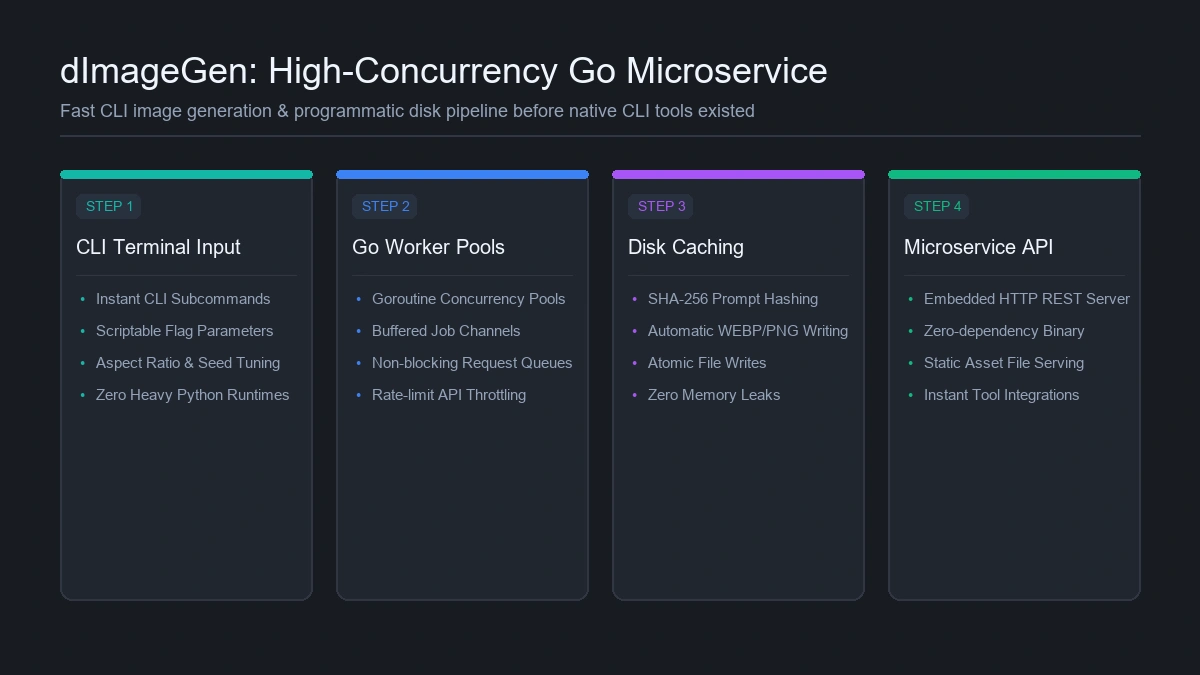 The dImageGen microservice architecture: CLI dispatch, concurrent Goroutine worker pools, SHA-256 disk caching, and embedded HTTP server
Why Go for AI Image Generation Tooling?
While Python dominates model training, Go is the undisputed king of fast, reliable infrastructure utilities. Building dImageGen in Go delivered several crucial advantages:
- Zero-Dependency Binary: Compiles into a single self-contained binary (
dimagegen.exe/dimagegen) with zero external runtime requirements. - Instant Startup: Executes in milliseconds without Python interpreter startup delays.
- Native Concurrency: Uses Goroutines and buffered channels to manage parallel generation requests without locking system resources.
Project Architecture & Package Structure
The codebase is structured following standard clean Go architecture:
E:\DevCode\src\dImageGen\
├── cmd\
│   └── dimagegen\              # Main CLI entrypoint & flag parser
├── internal\
│   ├── generator\            # Worker pool manager & API client
│   ├── cache\                # SHA-256 prompt hashing & atomic disk writer
│   └── server\               # Embedded zero-dependency HTTP REST API
├── memory-bank\              # System documentation & agent memory specs
└── go.mod
Key Technical Features
1. Worker Pool Pattern with Buffered Channels
To prevent overwhelming upstream generative APIs when executing batch scripts, dImageGen uses a worker pool pattern. Incoming CLI jobs are pushed into a buffered Go channel and processed by a fixed pool of worker Goroutines:
package generator

import (
	"context"
	"sync"
)

type Job struct {
	Prompt     string
	AspectRatio string
	OutputPath string
}

func StartWorkerPool(ctx context.Context, numWorkers int, jobs <-chan Job, wg *sync.WaitGroup) {
	for i := 0; i < numWorkers; i++ {
		wg.Add(1)
		go func(workerID int) {
			defer wg.Done()
			for {
				select {
				case <-ctx.Done():
					return
				case job, ok := <-jobs:
					if !ok {
						return
					}
					ExecuteGeneration(job)
				}
			}
		}(i)
	}
}
2. SHA-256 Prompt Hashing & Atomic Disk Writes
To avoid paying API costs for identical generation requests across automation scripts, dImageGen hashes prompt text, aspect ratio, and model parameters using SHA-256. If a matching cached file exists on disk, it returns immediately without an API call.
New images are written atomically via temp files to prevent partial file corruption if a process is interrupted.
3. Dual Mode: CLI Command & Embedded REST Server
dImageGen functions seamlessly in two modes:
- Direct CLI Tool: Run
dimagegen generate --prompt "retro server terminal" --aspect 16:9 --out ./cover.webpin any shell or build script. - Background Daemon: Run
dimagegen serve --port 8080to provide an embedded, lightweight REST API for local tools and scripts.
$ dimagegen generate \
    --prompt "retro 90s server rack CRT monitor charcoal aesthetic" \
    --aspect 16:9 \
    --out ./assets/server_rack.webp

[dImageGen v1.2] Initializing Goroutine worker pool (4 workers active)...
[Cache] SHA-256 Prompt Hash: 8f4e2b9c71a30d5e128... [MISS]
[Worker 2] Queued generation request -> Dispatching upstream API call...
[Worker 2] API Response received (2.41s) | Format: WEBP | Dimensions: 1920x1080
[DiskWriter] Writing atomic cache: ./assets/.tmp_server_rack.webp -> ./assets/server_rack.webp (248 KB)
[dImageGen] Success! Asset written to disk in 2.64s. Memory allocated: 14.2 MB
Results & Developer Uplift
dImageGen completely streamlined my content production and development pipelines. Instead of opening browser tabs, waiting for web UIs, and renaming downloaded files, a single shell command outputs optimised, production-ready WebP assets directly into project asset directories in seconds.
To learn more about how I leverage modern AI tooling across infrastructure, check out my article on from ‘continue…’ to autonomous deployment: how AI shifted 100% of my code, or explore my guide on free AI models and developer API keys.